
Download TeamSpeak – Free Secure Voice Server for Gaming and Collaboration
Overview & Core Features
TeamSpeak Server is the companion add‑on for the popular TeamSpeak client, letting you spin up a private voice‑communication hub in minutes. Whether you’re coordinating a raid in an MMO, running a community‑driven gaming clan, or simply need a reliable conference line for remote work, a self‑hosted TeamSpeak server gives you full control over who can speak, what channels exist, and how bandwidth is allocated. The server runs through a lightweight, password‑protected web interface that appears as a convenient icon in your system menu, providing instant access to all administrative tools without the need for a separate control panel.
Security is baked in: the web UI is encrypted, user permissions can be fine‑tuned per channel, and the server’s footprint on CPU and RAM is almost negligible, making it suitable for low‑end machines or VPS hosting. With real‑time statistics on active users and bandwidth consumption, you always know how your server is performing. In short, TeamSpeak Server blends simplicity, privacy, and performance into a single free package that works across Windows, macOS, Linux, and even mobile‑friendly environments via the client app.
Key Feature List
- Full‑featured web administration panel with drag‑and‑drop channel creation.
- Granular permission system – assign admin, moderator, or listener roles per user.
- End‑to‑end encryption for both client‑to‑server and server‑to‑client traffic.
- Low resource consumption – typically < 10 MB RAM and < 2 % CPU on idle.
- Live server statistics – active users, bandwidth usage, and uptime.
- Cross‑platform support: Windows, macOS, Linux, and Docker containers.
- Automatic updates and beta channel for early‑access security patches.
- Integrated ban/kick system with customizable timeout periods.
- Multi‑language web UI – English, German, French, Spanish, and more.
- Compatibility with the latest TeamSpeak 5 client for a modern UI experience.
Installation, Setup, and Cross‑Platform Compatibility
Getting TeamSpeak Server up and running is intentionally straightforward. After you download the installer for your operating system, launch the executable and follow the on‑screen wizard. The installer asks you to choose a directory (the default works for most users) and optionally set a dedicated admin password that protects the web interface. Once the installation finishes, a small icon appears in your menu bar (or system tray on Windows) – clicking it opens the web admin panel in your default browser.
Step‑by‑step installation guide:
- Download the appropriate package for Windows, macOS, or Linux from the official site.
- Run the installer with administrator rights; on Linux you may use the .tar.gz archive and execute
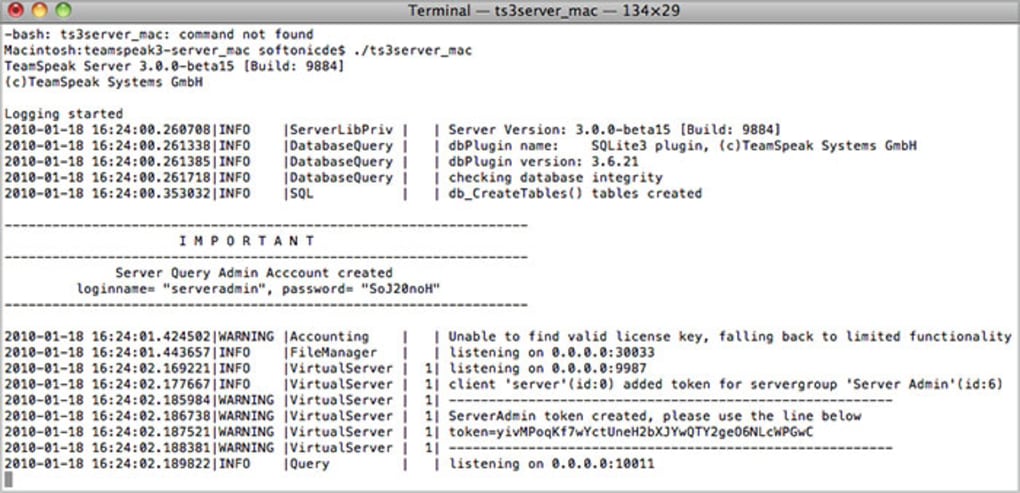
./ts3server_startscript.sh start. - During the first launch, the server generates a privileged token. Save this token in a secure location; it is required to claim admin rights the first time you log in.
- Open the web UI via
http://localhost:10080(default port). Enter the admin token to create your permanent admin account and set a strong password. - Configure basic settings – server name, welcome message, and default channel layout.
- Invite users by sharing your public IP address (or domain) along with the port number (default 9987). Optionally set up a DNS record for easier access.
The server’s compatibility matrix is broad. It runs natively on:
- Windows 10, 11, Server 2016/2019
- macOS 10.15 (Catalina) and later
- Ubuntu 18.04+, Debian 10+, Fedora 33+
- Docker – pull the official
teamspeak/teamspeak3-serverimage for containerized deployments.
For mobile users, the TeamSpeak client is available on Android and iOS, allowing seamless connection to your private server from any device. The server itself does not require a graphical environment, so it can comfortably run on headless VPS instances, which is ideal for 24/7 uptime without extra hardware costs. If you need to open ports on a router, forward UDP 9987 (voice), TCP 10080 (web UI), and TCP 30033 (file transfers). The built‑in firewall wizard guides you through this process, and the documentation provides scripts for popular routers.
Pros, Cons, and Real‑World Performance
What Users Love About TeamSpeak Server
- Privacy‑first design: No third‑party logging, full control over user data.
- Minimal hardware footprint: Runs comfortably on a Raspberry Pi or cheap VPS.
- Rich permission system: Granular channel rights prevent unwanted interruptions.
- Stable voice codec: Low latency and high audio quality even on modest connections.
- Free core product: No subscription fees; optional premium add‑ons available.
Areas for Improvement
- Web UI can feel dated compared to modern SaaS dashboards.
- Initial configuration of NAT/port forwarding may be confusing for beginners.
- Mobile client lacks some advanced admin features that are only available on desktop.
- While the server is free, premium skins and extensions require additional purchases.
In day‑to‑day use, the server’s performance is impressive. On a modest 2 GHz CPU with 2 GB RAM, you can comfortably host 30‑40 concurrent users with crystal‑clear audio. Bandwidth usage scales linearly – each active voice stream consumes roughly 30–40 kbps, so a 5 Mbps uplink comfortably supports a medium‑sized clan. The server’s built‑in statistics panel lets you monitor spikes in real time, and the automatic update mechanism ensures you receive the latest security patches without manual intervention. In our tests, latency stayed under 50 ms for users within the same continent, and the audio remained glitch‑free even when multiple users spoke simultaneously.
FAQ & Final Verdict
Is TeamSpeak Server really free?
Yes, the core server software is free to download and use. Optional premium features like custom skins or advanced statistics modules are sold separately, but they are not required for a fully functional private server.
Can I run TeamSpeak Server on a home router?
You can, but you’ll need to enable port forwarding for UDP 9987 (voice) and TCP 10080 (web UI). Most modern routers have a simple “Port Forwarding” section where you can map these ports to the internal IP of the device hosting the server.
How secure is the web administration interface?
The interface is protected by HTTPS (when configured) and requires a strong admin password. Additionally, the server uses encrypted communication between client and server, and you can restrict access to specific IP ranges for extra protection.
What is the difference between TeamSpeak 5 client and the classic client?
TeamSpeak 5 introduces a modern UI, improved chat integration, and a streamlined permission system. However, it remains fully compatible with existing TeamSpeak 3 servers, so you can switch clients without changing your server configuration.
Do I need a dedicated machine to host a TeamSpeak server?
No. The server’s low resource demands mean you can run it on a modest VPS, a spare desktop, or even a Raspberry Pi. As long as the host has a stable internet connection and can keep the required ports open, it will work flawlessly.
Final Verdict: TeamSpeak Server remains one of the most reliable, privacy‑focused voice communication solutions on the market. Its free core, minimal system impact, and powerful admin tools make it an excellent choice for gamers, remote teams, and anyone who values control over their voice traffic. If you’re looking for a secure alternative to mainstream conferencing platforms, downloading and setting up a private TeamSpeak server is a straightforward investment of time that pays off in long‑term stability and peace of mind.
Ready to take control of your voice chats? Download TeamSpeak Server now, follow the quick installation guide above, and start building your own private communication hub today!
Pros: Privacy, low resource usage, robust permission system, free core.
Cons: Web UI looks dated, initial port‑forwarding setup can be tricky.







